A while back, a senior colleague of mine was migrating a service from session-based authentication to token-based authentication. That got me curious. I decided to dive deeper into the topic, experiment a bit, and see how these approaches work in practice.
What’s the Difference?
The key difference between session-based and token-based authentication lies in where the state lives:
- In session-based authentication, the server maintains the state (session information).
- In token-based authentication, the state is encoded in the token and lives on the client side.
Session-Based Authentication
In session-based authentication, after a user logs in, the server creates a session and assigns it a session ID. This session ID is stored on the client side (usually in a cookie). For every subsequent request, the client sends the session ID back to the server. The server checks its session store to validate the user.
Here’s a quick rundown of how it works with some Flask magic:
Example: Session-Based Authentication in Python
from flask import Flask, request, session, jsonify

app = Flask(__name__)
app.secret_key = 'supersecretkey'  # Used to sign session cookies

@app.route('/login', methods=['POST'])
def login():
    username = request.json.get('username')
    password = request.json.get('password')

    # Dummy credentials check
    if username == 'user' and password == 'pass':
        session['user_id'] = username  # Store the user's ID in the session
        return jsonify(message="Login successful"), 200
    return jsonify(message="Invalid credentials"), 401

@app.route('/protected', methods=['GET'])
def protected():
    if 'user_id' in session:
        return jsonify(message=f"Hello, {session['user_id']}!"), 200
    return jsonify(message="Unauthorized"), 401

@app.route('/logout', methods=['POST'])
def logout():
    session.pop('user_id', None)  # Remove user ID from session
    return jsonify(message="Logged out"), 200

if __name__ == '__main__':
    app.run(debug=True)
How It Works:
- When the user logs in, the server creates a session and stores the
user_id. - The client gets a session cookie, which is sent with every request.
- The server checks the session store to validate the user.
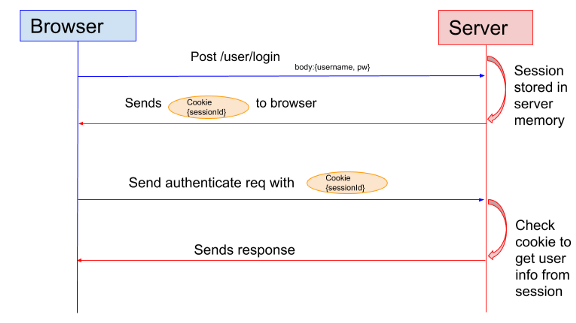
It’s simple, but the server has to maintain the session state, which can get tricky when scaling.
Token-Based Authentication
Token-based authentication is all about moving the state to the client. After the user logs in, the server generates a token (often a JWT) that contains the user information. The client stores the token and sends it with every request. The server validates the token to authenticate the user.
Here’s how I played around with it:
Example: Token-Based Authentication in Python
import jwt
from flask import Flask, request, jsonify

app = Flask(__name__)
SECRET_KEY = 'supersecretkey'

# Create a JWT
def create_jwt(user_id):
    return jwt.encode({'user_id': user_id}, SECRET_KEY, algorithm='HS256')

# Decode a JWT
def decode_jwt(token):
    try:
        return jwt.decode(token, SECRET_KEY, algorithms=['HS256'])
    except jwt.ExpiredSignatureError:
        return None
    except jwt.InvalidTokenError:
        return None

@app.route('/login', methods=['POST'])
def login():
    username = request.json.get('username')
    password = request.json.get('password')

    # Dummy credentials check
    if username == 'user' and password == 'pass':
        token = create_jwt(username)
        return jsonify(token=token), 200
    return jsonify(message="Invalid credentials"), 401

@app.route('/protected', methods=['GET'])
def protected():
    auth_header = request.headers.get('Authorization')
    if not auth_header or not auth_header.startswith('Bearer '):
        return jsonify(message="Unauthorized"), 401

    token = auth_header.split(" ")[1]
    decoded = decode_jwt(token)
    if decoded:
        return jsonify(message=f"Hello, {decoded['user_id']}!"), 200
    return jsonify(message="Unauthorized"), 401

if __name__ == '__main__':
    app.run(debug=True)
How It Works:
- The server generates a token with the user’s information and sends it to the client.
- The client sends the token in the
Authorizationheader for subsequent requests. - The server validates the token using its secret key.
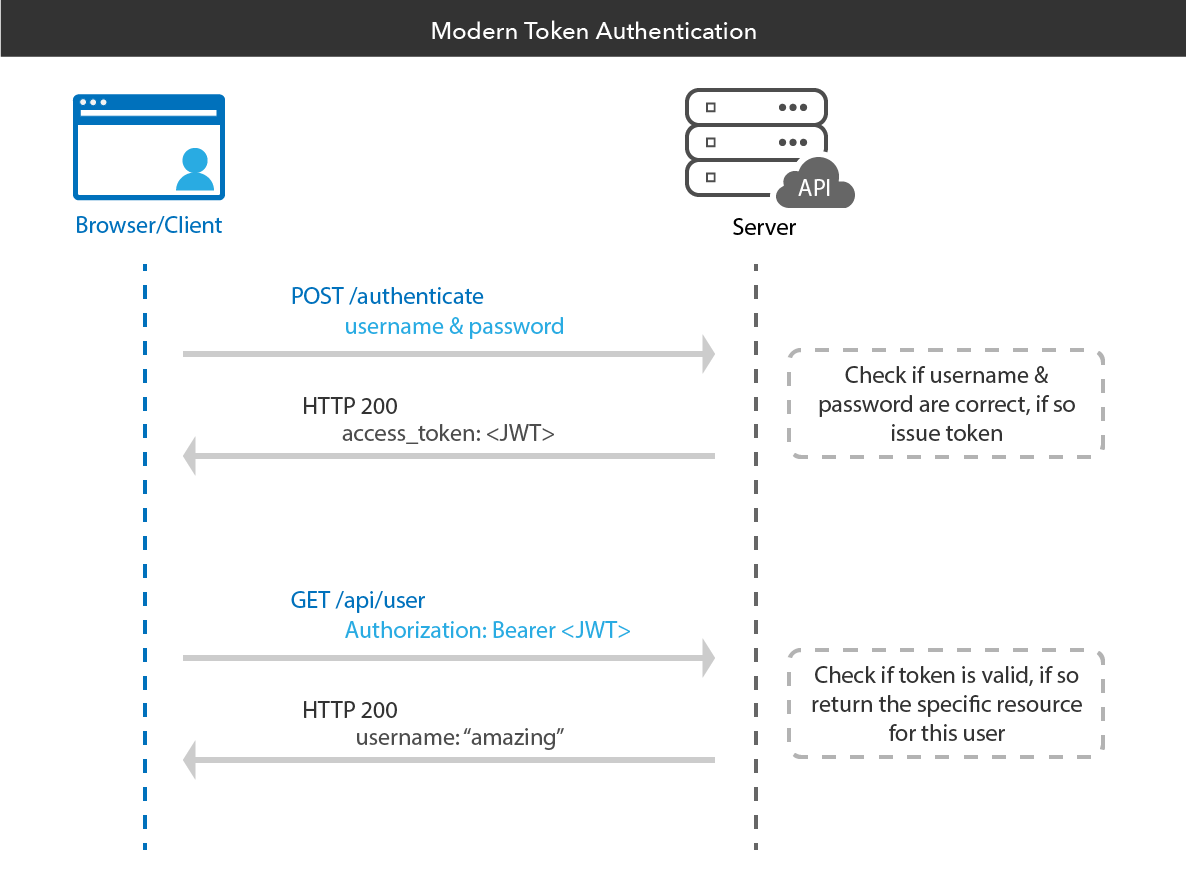
This approach is stateless, meaning the server doesn’t need to maintain a session store. Perfect for scaling!
Comparing the Two Approaches
Here’s a quick summary of what I learned:
Session-Based Authentication
- The server maintains the session state.
- Easier to invalidate sessions.
- Great for single-domain applications where scaling isn’t a concern.
Token-Based Authentication
- The client holds the state (in the form of a token).
- Scales well horizontally because the server is stateless.
- Ideal for distributed systems or APIs.